
Definition of a New Time Series
A time series object in HAKOM TSM is defined by the following properties:
-
ID and Name: unique identification of the time series
-
Type: period type (cyclic or acyclic) and alignment of the values relative to the time axis (left- or right-aligned) - see Time Series Types in Comparison
-
Interval and Interval Length: basic raster for data persistence - here you should always select the highest resolution necessary - see Intervals and Raster
-
Unit: for conversions and aggregations - see Units and Aggregation Rules
-
Description: additional text for organization and search
-
Formula (optional): calculation formula which is evaluated in runtime - see Formulas and Time Series
Further categorizations and extensions of the data model are possible using attributes – see Attributes and Time Series.
Time series can be linked to other time series using formulas through a rich set of predefined and extensible functions. TSM App supports the development of formula functions by a formula editor with IntelliSense support:
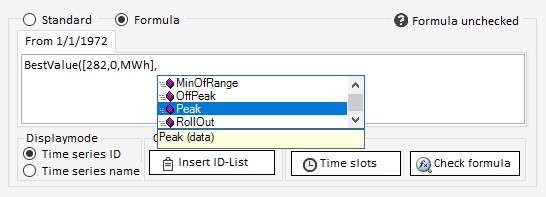
More details see Formulas and Time Series.
The Minimum Definition
At least the following properties are needed to store a time series in TSM App:
-
Name
-
Type
-
Interval
-
Unit
In the WebTSM Services API all other properties of the /timeseries request body can be omitted:
{
    "Name": "MyFirstTimeSeries",
    "Type": 2,
    "Interval": {
        "Value": "Minute",
        "Multiplier": 15
    },
    "Unit": "KWh"
}
Advanced Definition and Control Options
Dimension and compression options:
-
Enable historization - see Audit and Quotation
-
Enable quotations and set Quotation Default Behavior - see Audit and Quotation
-
Enable compression - see Time Series Compression
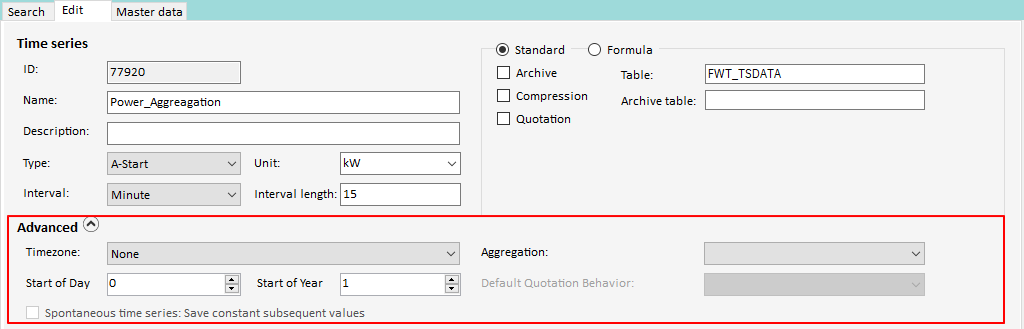
In TSM App these options are available in Time Series Search - Edit tab - under Standard radio button. In WebTSMServices API the underlying options are part of the time series definition body.
Advanced definition parameters:
-
Set time zone - see Working with Time Zones
-
Set aggregation rule - see Units and Aggregation Rules
-
Set year start and start time (to display the beginning of a gas year - from October to October - or to display the beginning of a gas day - from 06:00 to 06:00)
In TSM App these options are available in Time Series Search - Edit tab - under Advanced expandable menu. In WebTSMServices API the underlying options are part of the time series definition body.
Create a New Time Series
New time series can be created in TSM App or WebTSM Services API.
TSM App:
-
Click on Load in the TSM Ribbon
-
Press the Search... button in the Time series area of the TSM window
-
Select the Edit tab in the Time Series Search window
-
Enter name, type, interval and unit, if necessary formula
-
Press the Save button
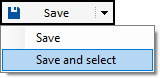
In order to select the time series immediately after the creation in Time Series Search, the Save button drop-down menu Save and Select can be used:
WebTSM Services API:
-
Create single time series: POST
/repositories/:reposiory/timeseries -
Create multiple time series in bulk: POST
/repositories/:reposiory/timeseriescollections/definition
More about the WebTSM Services API can be found here:
Open API Reference
We recommend the following videos under Video Tutorials:
-
Introducing the HAKOM TSM
-
Introducung Postman & hosting the services
-
Creating Time Series